Last updated: 2026-03-04 01:41:52The Python language
Introduction
In this section, we briefly introduce the basic concepts, terminology, and syntax of the Python programming language.
Note
This chapter serves as a brief summary of one of the topics which are prerequisites of the main contents of the book (Prerequisites). Readers who are already familiar with the material, can either skip this chapter, or go over it for recollection and self-check, before going further. Readers who are new to the material, can use this chapter as a checklist of the topics they need to focus on when learning the prerequisites of the book.
Note
For a detailed introduction to the topics presented in this chapter, see the following chapters from the Introduction to Spatial Data Programming with Python book:
What is Python?
Python is a popular general-purpose programming language. It is free, open source, with relatively intuitive and human-readable syntax, making it the preferred choice in a wide range of domains.
Python setup
Setting up the Python environment is beyond the scope of this book. In this rest of the book, it is assumed that you have:
- a working Python environment,
- with the required third-party packages (Software) installed,
- a directory where the sample
data(Datasets),output(Output files), and thenet2module (The net2 module) were downloaded and placed in (see Directory tree), and - an interface (e.g., Jupyter notebook) connected to the Python environment and started in the above-mentioned directory, where you can edit and execute code examples from the book
For more details, you can refer to the Setting up the environment chapter in the Introduction to Spatial Data Programming with Python course, or any other online resource on setting up a Python environment.
For a quick check, run the following code which imports and plots a sample road network, which we will be working with in later chapters. The code section assumes that the networkx package, the net2 module, and the output/roads2.xml file, are accessible:
import networkx as nx
import net2
G = nx.read_graphml('output/roads2.xml')
G = net2.prepare(G)
nx.draw(G, with_labels=True, pos=net2.pos(G))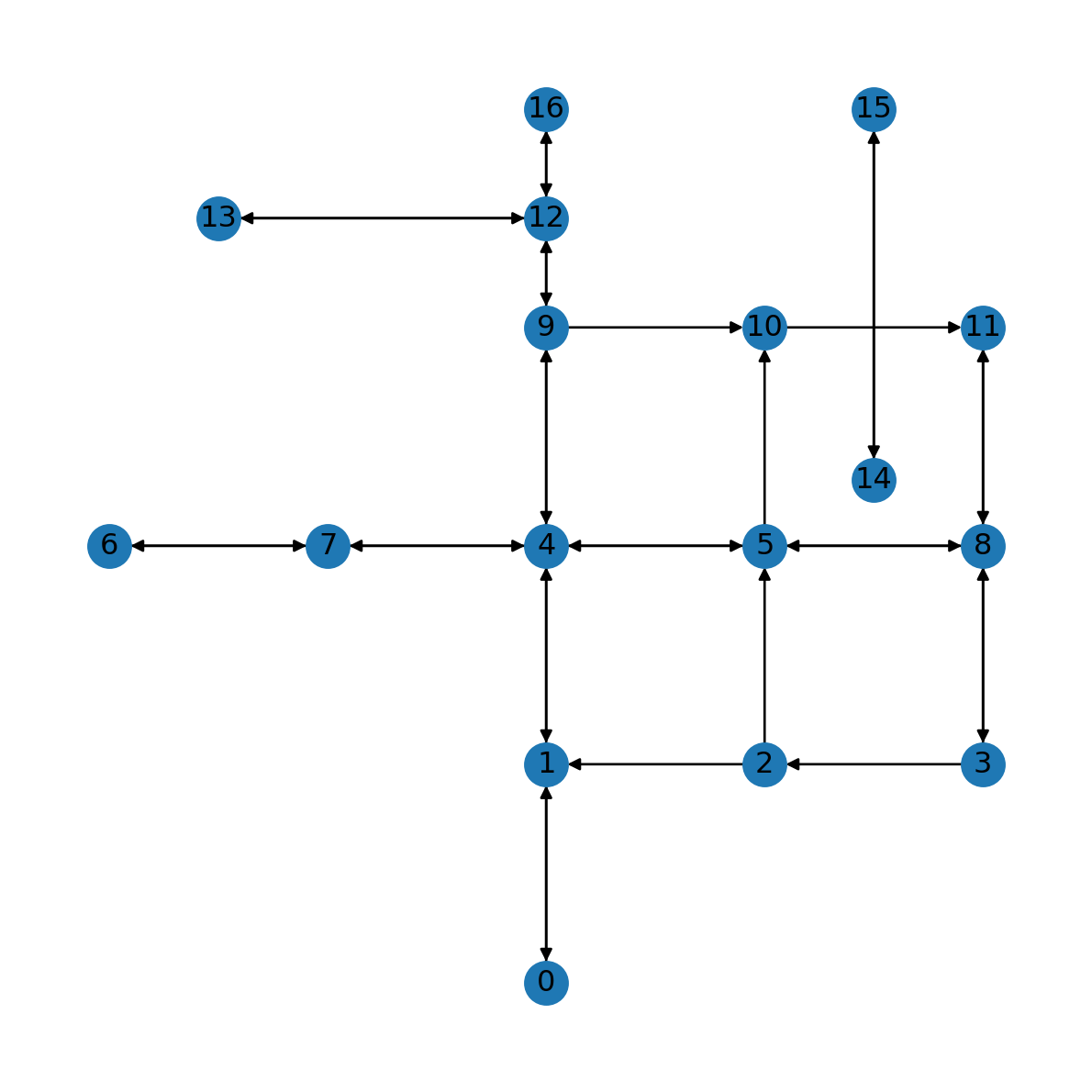
Basic syntax
Assignment
The basic concept of a programming language is assignment, the association of a variable with a value, or object. For example, here we assign the (numeric) value 12 to a variable named x:
x = 12The variable can then be used in subsequent expressions. For example, here we are just printing it:
x12while here we are using the arithmetic multiplication operator:
x * 10120Data types
Overview
In this section we go over the important properties and methods of Python’s basic data types (Table 2.1).
| Data type | Meaning | Divisibility | Mutability | Example |
|---|---|---|---|---|
int |
Integer | Atomic | Immutable | 7 |
float |
Float | Atomic | Immutable | 3.2 |
bool |
Boolean | Atomic | Immutable | True |
None |
None | Atomic | Immutable | None |
str |
String | Collection | Immutable | 'Hello!' |
list |
List | Collection | Mutable | [1,2,3] |
tuple |
Tuple | Collection | Immutable | (1,2) |
dict |
Dictionary | Collection | Mutable | {'a':2,'b':7} |
set |
Set | Collection | Mutable | {'a','b'} |
Numbers
Numbers in Python are represented using:
int—Integers, i.e., whole numbersfloat—Floating-point numbers, i.e., numbers with a decimal point
Python’s arithmetic (+, -, *, /) and conditional (>, <, >=, <=, ==, !=) operators are commonly used with numbers. For example, the following expression combines two int values and the arithmetic operator +:
10 + 717The following expression combines the same two int values with the conditional operator >:
10 > 7TrueThe result in this case is the boolean value True (see Booleans).
The round function can be used to round numeric values, possibly specifying the number of decimal places. For example:
round(10.3794)10round(10.3794, 2)10.38Booleans
Boolean values are used to specify whether a given condition is True or False. They are often the result of conditional operators:
2 != 2FalseStrings
Strings (str) are ordered sequences of characters. A string can be created using single or double quotes. For example:
'Hello''Hello'"World"'World'Lists
A list is an ordered collection of elements, of any type. A list can be created using square brackets, with elements separated by commas. For example, here we create a list named a with three elements (which are all numbers):
a = [2, 7, 1]
a
[2, 7, 1]and here we create a list of lists named b:
b = [
    [1, 0, 0],
    [2, 1, 2],
    [3, 1, 0],
    [2, 7, 1]
]
b
[[1, 0, 0], [2, 1, 2], [3, 1, 0], [2, 7, 1]]The number of elements (i.e., length) of a list can be calculated with len:
len(a)3len(b)4The .append method can be used to append elements, at the end of the list. This method is particularly useful inside a for loop (for loops). For example, consider list a:
a[2, 7, 1]Here is how we can append the additional element 100 at the end of a:
a.append(100)Let’s print the modified list:
a[2, 7, 1, 100]List elements can be extracted using square brackets combined with a numeric index. Importantly, indices in Python start from 0. For example:
a[0]2a[3]100A sub-list can be created using special indices called slices, containing the : symbol. For example, here is how we can extract a sub-list containing the 2nd to 3rd elements:
a[1:3][7, 1]List and tuple (see Tuples) elements can be “unpacked” to multiple separate variables at once. For example:
x, y = [10, 23]x10y23Tuples
Tuples (tuple) are similar to lists, but are immutable. This means that tuples can’t be changed after they are created, e.g., using .append (see Lists). A tuple can be created using parentheses. For example:
(2, 7, 5)(2, 7, 5)Dictionaries
Python dictionaries (dict) are collections of key:value pairs. Dictionaries can be created using curly brackets. For example:
d = {'user': 'michael', 'password': 12345}
d
{'user': 'michael', 'password': 12345}Dictionary values are accessible through the keys. For example:
d['user']'michael'd['password']12345All dictionary keys can be extracted at once using the .keys method:
d.keys()dict_keys(['user', 'password'])For convenience, the object can be converted to a list:
list(d.keys())['user', 'password']Similarly, we can extract dict values using the .values method:
list(d.values())['michael', 12345]or both keys and values using the .items method:
list(d.items())[('user', 'michael'), ('password', 12345)]Using the in operator, we can check whether a dict has a given key:
'user' in dTrue'firstname' in dFalseif-else conditionals
if-else conditionals are used to condition the execution of code on boolean values. For example, suppose we have a numeric value x:
x = -3The following code section prints either positive or not positive, depending on the value of x:
if x > 0:
    print('positive')
else:
    print('not positive')
not positiveConditionals are often useful inside for loops (for loops), in cases when we want to selectively apply different code sections depending on element values.
Loops
for loops
for loops are used to go over the elements of an iterable object (e.g., a list), typically doing something with each element. The following example is a minimal for loop, where we print each element of the list [2,7,1]:
for i in [2,7,1]:
    print(i)
2
7
1And here is an example of a for loop that goes over dict keys:
d = {'a':10, 'b':20, 'c':30}
for i in d:
    print('the value of', i, 'is', d[i])
the value of a is 10
the value of b is 20
the value of c is 30The following example uses a conditional (if-else conditionals) inside a for loop, printing only those list elements which are unequal to 7:
for i in [2,7,1]:
    if i != 7:
        print(i)
2
1The continue keyword inside a for loop “jumps” to the next loop iteration. Here is a code section with the same outcome as the last one, using continue:
for i in [2,7,1]:
    if i == 7:
        continue
    print(i)
2
1Here is a more complicated example of a for loop. Suppose that we have a list composed of numeric values named x:
x = [2,7,1,0,-2,3,8,0]
x
[2, 7, 1, 0, -2, 3, 8, 0]Here is how we can use a for loop to find the minimal element. First, we define a variable named min_value, with the initial special float value inf (i.e., infinity):
min_value = float('inf')
min_valueinfThen, inside a for loop, we go over the values of x, each time comparing the current value i to min_value. If the current value i is smaller than min_value, then min_value is replaced with i:
for i in x:
    if i < min_value:
        min_value = i
In the end, min_value holds the minimal value of x:
min_value-2Here is the complete code section for finding the minimum of x:
min_value = float('inf')
for i in x:
    if i < min_value:
        min_value = i
min_value
-2
Practice
- Which changes need to be made in the above code to calculate the maximum of the list?
Note
Python has built-in function min for finding the minimum of a list. However, the above approach is still useful when the comparison being made is more complex and/or we extract several metrics associated with the selected element rather than just the minimum value (e.g., Nearest node).
We are going to use this idea to find the nearest node (Nearest node) and nearest edge (Nearest edge) in a network.
When iterating over a dict using a for loop, the obtained values are in a for loop:
d = {'user': 'michael', 'password': 12345}
for i in d:
    print(i)
user
passwordtry-except
When automating our workflow to operate on a collection—such as processing multiple files, or running a simulation with multiple parameters—the script may crash due to an issue with one of the collection elements. For example, when processing a list of files, one of the files in the collection may be corrupt, in which case an error is raised and the script is terminated. Instead, sometimes we prefer to specify what should be done when an error is encountered, other than terminating the script. For example, we may want to ignore the corrupt file, or to create an arbitrary output for that file, etc. The set of techniques where we determign what to do when an error is raised is known as exception handling.
The basic way of exception handling in Python is try-except. Code suspected to result in an error can be placed in the try code block, followed by an alternative code in the except block. When an error is raised in the try block, the alternative except block is executed.
For example, the following for loop attaches the character ! at the end of the given string and prints the result. When reaching element 2, an error is raised and the code terminates. Consequently, element 'd' remains unprocessed:
for i in ['a', 'b', 2, 'd']:
    print(i + '!')
a!
b!TypeError: unsupported operand type(s) for +: 'int' and 'str'
Here is an alternative code section, using try-except which attempts processing of all list elements, printing a text message in those cases when an error was raised:
for i in ['a', 'b', 2, 'd']:
    try:
        print(i + '!')
    except:
        print('element', i, 'failed...')
a!
b!
element 2 failed...
d!list comprehension
List comprehension is a “shortcut” to for loops where we do something with each element, and get back a list with the results. For example, consider the list a as “input”:
a[2, 7, 1, 100]Here is an example of a list comprehension expression, where the “output” is a list with a elements multiplied by 10:
[i*10 for i in a][20, 70, 10, 1000]dict comprehension
Dictionary comprehension is an analogous technique to list comprehension (list comprehension), where the result is a dict. Accordingly, each element is a key:value pair. For example:
a[2, 7, 1, 100]{str(i): i*10 for i in a}{'2': 20, '7': 70, '1': 10, '100': 1000}Useful functions
abs
The abs function returns the absolute value of a number:
abs(-7)7range
The range function is used to create numeric sequences with equal intervals. In the simplest use case, range returns integers starting from 0 and up to the specified number (excluding self):
range(8)range(0, 8)list(range(8))[0, 1, 2, 3, 4, 5, 6, 7]zip
The zip function is used to rearrange two (or more) iterable objects into tuples of corresponding elements. For example, suppose that we have two lists of the same length x and y:
x = [3,4,9,8]
y = [2,1,0,9]
zip returns a new collection with the 1st elements from x and y, the 2nd elements from x and y, and so on:
z = zip(x,y)
list(z)
[(3, 2), (4, 1), (9, 0), (8, 9)]Another task that can be solved with zip is going from a list of values, to a list of consecutive tuples. For example, consider a list of location IDs x:
x = [2, 0, 4, 9, 5]
x
[2, 0, 4, 9, 5]The following expression converts it to a list of tuples with the “steps” we go through when traveling between those locations, consecutively:
list(zip(x, x[1:]))[(2, 0), (0, 4), (4, 9), (9, 5)]We are going to need this technique in Graphics: Route.
Finally, zip can be used to transform a pair of corresponding lists, to a dict. For example:
x = ['a','b','c','d']
x
['a', 'b', 'c', 'd']y = [7,3,8,-2]
y[7, 3, 8, -2]dict(zip(x, y)){'a': 7, 'b': 3, 'c': 8, 'd': -2}Python packages
Packages are collections of code, defining functions and data structures, on top of the built-in basic syntax. The Python installation comes with several “official” add-on packages, called the standard library. On top of that, there are numerous packages known as third-party packages, contributed by individual developers and organizations.
Assuming that a package is installed, before using its functions it needs to be loaded using the import keyword. For example, here is how we can load the standard glob package:
import globOnce loaded, we can access the package functions using the general form package.function. For example, the glob package contains a function of the same name:
glob.glob<function glob.glob(pathname, *, root_dir=None, dir_fd=None, recursive=False, include_hidden=False)>
Note
Both standard and third-party packages you use in your Python code need to be loaded, using the import keyword. Third-party packages, however, also needs to be installed, a one-time operation of downloading the package files and placing them on your computer, in a location which Python can access when loading the package. Package installation takes place on the command line. For example, when using the Anaconda Python distribution, the expression to install package numpy is conda install -c conda-forge numpy. Setting up a Python environment and installing packages is beyond the scope of this book; see Python setup for details and recommended materials.
The glob.glob function returns a list of strings with the file paths matching a given pattern. For example, here is how we can list files in the data directory (assuming it is in our working directory):
glob.glob('data/*')['data/roads.xml',
'data/mapbox_response.json',
'data/ne_110m_admin_0_countries.shp',
'data/gas-stations.geojson',
'data/europe.gpkg',
'data/ne_110m_admin_0_countries.cpg',
'data/ne_110m_admin_0_countries.shx',
'data/dem.tif',
'data/ne_110m_admin_0_countries.prj',
'data/ne_110m_admin_0_countries.dbf']Function definition
A Python function can be defined using the def keywork. As part of the function definition, we can specify the parameters (possibly with default values), and the returned value. For example, here is how we define a function named add_five which adds 5 to the specified value x (default 0) and returns the result:
def add_five(x=0):
    result = x + 5
    return result
Here are examples of a add_five function calls, first using the default x and then using a custom value of 77:
add_five()5add_five(77)82Here is another, more complex, function definition. This function accepts two arguments named lon and lat (longitude and latitude, respectively), and returns the EPSG code of the corresponding UTM zone:
def lonlat_to_utm(lon, lat):
    import math
    utm = (math.floor((lon + 180) / 6) % 60) + 1
    if lat > 0:
        utm += 32600
    else:
        utm += 32700
    return utm
For example, given the coordinates of Beer-Sheva, lonlat_to_utm returns 32636, which is the EPSG code of the UTM zone where Beer-Sheva is located, UTM zone 36N:
lonlat_to_utm(34.78667, 31.252221)32636Note that the function code uses the math.floor function from the math package, which we need to import.
Variable-length positional arguments
Sometimes, the arguments that we would like to pass to a function exist in our environment in the form of a list. A common scenario is that the values are collectively returned by another function. For example, suppose that we have in our environment a list object named coords, returned by some function, containing the coordintes that we would like to pass to lonlat_to_utm (Function definition):
coords = [34.78667, 31.25222]
coords
[34.78667, 31.25222]Using the ordinary function call syntax, we can do this:
lonlat_to_utm(coords[0], coords[1])32636However, we can also use a shortcut known as variable-length positional arguments:
lonlat_to_utm(*coords)32636Passing a list preceded by * to a function “unpacks” the list into separate arguments. Therefore, the above two expressions are equivalent.
Custom modules
When doing repetitive tasks in our Python code, it makes sense to define reusable functions (Function definition) and call them as much as necessary throughout our script. However, when we use the same function in different scripts and projects, it makes sense to move the function definition into a separate script (.py file), and then import the script in any other script or notebook file where we need to use the function. Such a .py script is known as a module.
For example, suppose we place the add_five function definition from Function definition into a .py file named helpers.py. Then, we can import the helpers module in another Python script or notebook using:
import helpersHow does the Python interpreter locate the file(s) of the module or package we are trying to import? This question introduces the search path concept. The search path, basically, is the set of directories where Python looks for when we try to import a module or package using import. By default, the search path includes the directory containing the input script or notebook. That is, if both the helpers.py file and the python script or notebook file where we call import helpers are in the same directory, then the import expression is going to work. This is the workflow we are going to use in this book with the custom net2 module we will be writing and using for our custom functions. Therefore, when following the material, make sure to download the net2.py file, and place it in the same directory where the files with the code examples are.
Note
When writing a custom module, it makes sense to place it in a specific directory, and then re-use it in scripts and notebooks which may be spread across different directories. To do that, you need to add that specific directory to the search path, either temporarily (i.e., just for the current Python session) or permanently (i.e., for any Python session).
To temporarily add a given directory to the search path, you can use:
import sys
sys.path.append("/path/to/directory/")
Permanently adding a directory to the Python path can be done in several ways, depending among others on the operating system. For example, on Linux, it can be done by modifying the PYTHONPATH variable through the command line:
export PYTHONPATH="${PYTHONPATH}:/path/to/directory/"Once the module is imported, we can call any of its functions anywhere in our script or notebook, using module.function. For example, here is how we can call the add_five function:
helpers.add_five(77)82
Note
The difference between a Python package (Python packages) and module, is that a module is a single .py file, while a package is a collection of files. Both a module and a package, however, serve exactly the same purpose in terms of code re-use and reproducibility, and they are both imported the same way, using import statements. In this book, we are going to use:
- Several existing standard-library packages, such as
math - Several existing third-party packages, such as
numpy(e.g., Arrays with numpy) - One custom module with our own functions, named
net2(e.g., Creating regular grids)
Exercises
Exercise 01-01
- Calculate a
listof 10 random points, where a “point” is alistof length 2 of the form[x,y]withxandyrandomly placed between0and1
Exercise 01-02
- Find the element whose sum is the minimal, among the elements of the
listnamedbdefined in Lists
Exercise 01-03
- Create a file named
crs.pyand place thelonlat_to_utmfunction (Function definition) definition into the file - Create a Jupyter Notebook where you import the
crs.pymodule, and then use thelonlat_to_utmfunction to determine the UTM zone for the point[34.78667,31.25222]